Service manager
The service manager workspace answers one question continuously: is service going well right now, and if not, where?
The tabs
Section titled “The tabs”| Tab | What it holds |
|---|---|
| Overview | The state of service at this moment |
| Attention | Things that need a decision, ranked |
| Team | Who is working, and what they have been doing |
| Quality | Signals that service is slipping |
Overview
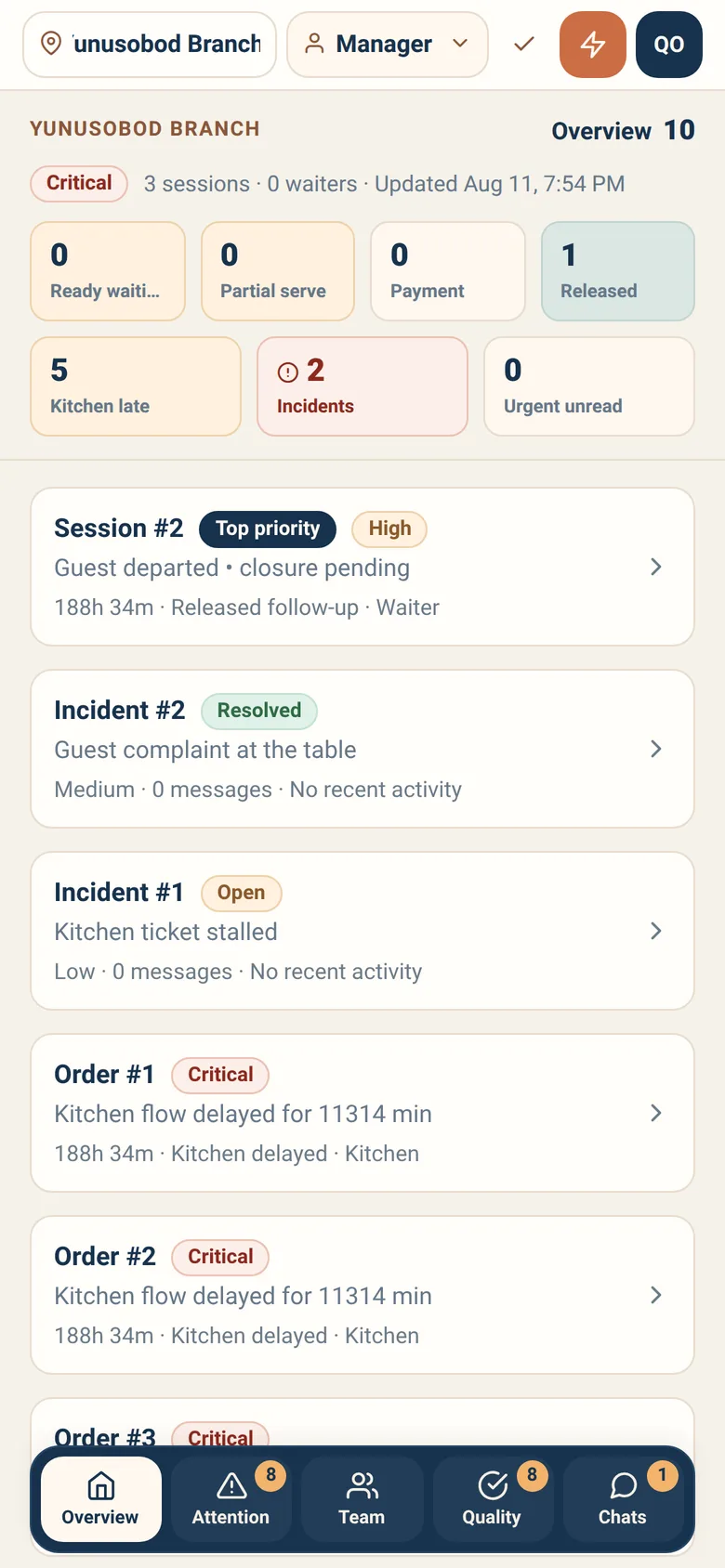
Section titled “Overview”A small set of numbers, chosen because each one implies an action. Seven cells, and every one of them opens the queue it is about:
| Signal | What it tells you |
|---|---|
| Ready waiting | Food made and not taken out — waiter capacity |
| Partial serve | Orders where some of the food went out and some did not |
| Payment | Orders blocked on payment — cashier capacity |
| Released | Sessions with unresolved follow-up |
| Kitchen late | Tickets past their time — kitchen capacity |
| Incidents | Open service incidents |
| Urgent unread | Conversations nobody has answered |
Over the grid sits one word for service as a whole: Calm, Busy, High pressure or Critical. It is the branch’s service health, not any one department’s — there is no “kitchen load” summary anywhere in the workspace, and Overloaded / Normal / Idle belongs to a different screen: it is the Team tab’s filter over individual waiters.
Read the cells together. Ready-waiting high while nothing is late in the kitchen is a floor problem, not a kitchen one — and the fix is a waiter, not a cook.
Attention
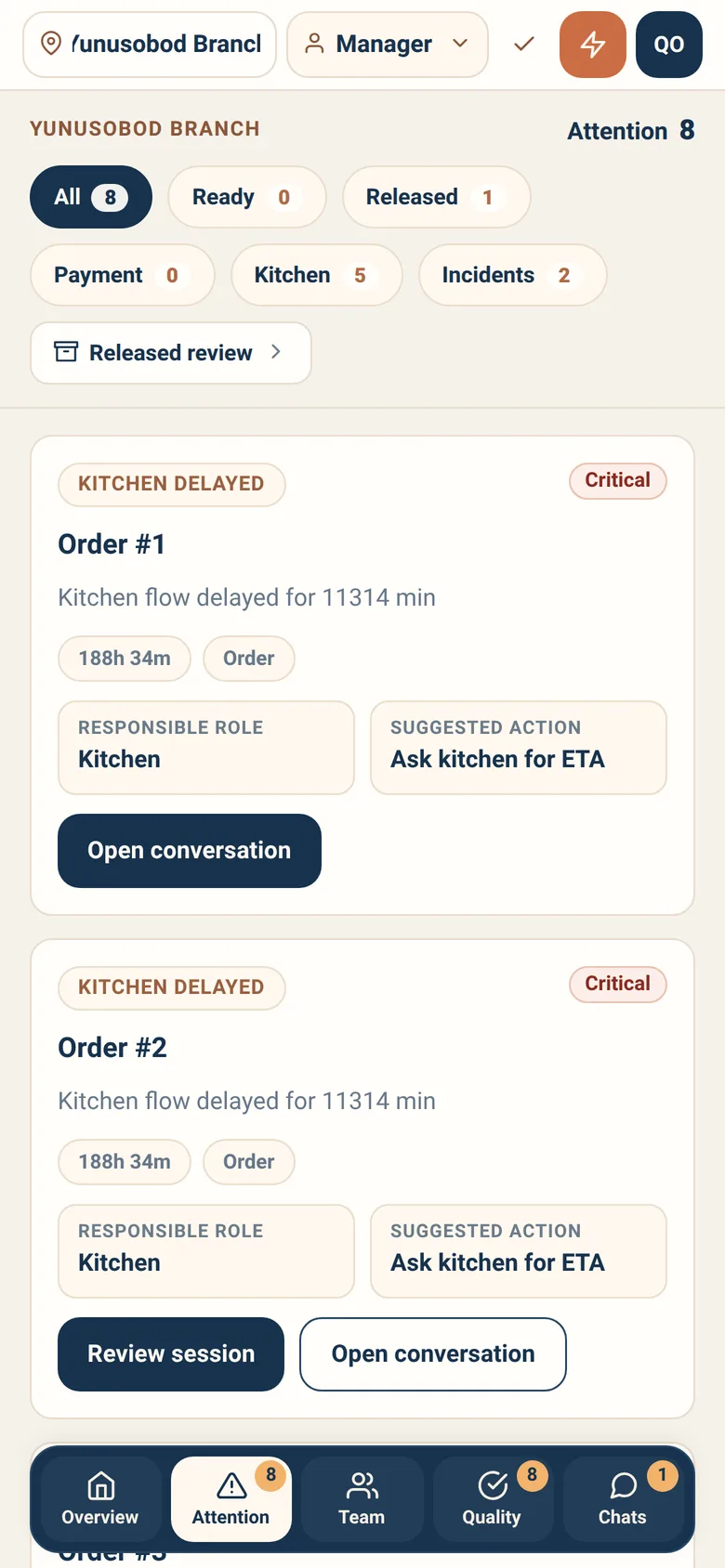
Section titled “Attention”The queue of things that need you, ranked, each with the responsible role and a suggested action.
Types you will see:
- Kitchen delayed
- Guest complaint
- Override request
- Unanswered conversation
- Incident
- Staff issue
- Robot fallback
Severity runs Critical, High, Medium, Low. Work critical first — that is the whole point of the ranking.
Suggested action is guidance, not an instruction. You know the room.
Quality
Section titled “Quality”Patterns rather than single events — the things that mean service is degrading even when no one has complained yet:
- Long ready-to-serve delay
- Long pending-payment delay
- Long kitchen delay
- Repeated waiter no-response
- Active complaint conversation
- Cancelled order
- Unresolved released session
- Service recovery incident
Each card carries two cells: Recovery owner — the roles involved — and Suggested recovery, the next move Sitora would make. These are for conversations after service, not mid-rush firefighting.
Waiters, and only waiters. This is floor coverage — who is on, what they have been doing, and how their work is distributed — not a roster of everybody in the branch. Cooks, cashiers and couriers are not here.
Each waiter carries a load state, and the filter above the list is those states: All, Overloaded, Normal, Idle, each with its count. This is the one place those three words appear.
Two things to keep in mind:
- It is derived from real operational records, not from a clock-in system. It reflects what people actually did in the app.
- It is not a payroll ledger. Earnings figures are estimates. Useful for a conversation about workload; not a wage slip.
Incidents and released sessions
Section titled “Incidents and released sessions”Opening an incident shows a fixed grid of six facts — Assigned role, Created by, Opened, Last activity, Messages, Resolved — and the conversation underneath. You record what you decided and why; the reason is part of the record.
It does not suggest a recovery. That is a Quality-card cell, not an incident one — if you want Sitora’s suggestion, it is on the Quality tab.
Released session review is the manager’s view of sessions the floor could not close. Use it when a session has been sitting too long, or when a waiter needs a decision above their level.
Pausing robot serving
Section titled “Pausing robot serving”The only thing a manager can pause is the robot fleet, and only where a branch runs one. The fleet strip on the overview shows the vendor, whether the fleet is online, and — when the backend allows the verb — Pause and Resume. It is a real consequence, not a display toggle, so it asks for a reason and asks you to hold.
What it stops is narrow, and the sheet says so: New robot offers stop immediately for this branch. Robots already on a task finish it. Staff serve flows are unchanged. Guests keep ordering, the kitchen keeps cooking, and waiters keep serving.
Pausing order intake is not a manager verb. Stopping the branch from taking new orders belongs to the branch admin — see Branch admin. A manager who needs intake stopped asks one.
Day-to-day recipes
Section titled “Day-to-day recipes”Ready-waiting is climbing. Food is being made and not taken out. Put someone on the floor, or take it out yourself. Check Released too — some of it may belong to guests who left.
Kitchen is overloaded. Expect delays and get ahead of them: talk to the floor about what to tell guests. If it is unsustainable, intake has to stop — ask a branch admin, because you cannot stop it yourself.
Urgent unread is not zero. Someone is waiting for an answer. Unanswered conversations turn into complaints — this is the cheapest problem on the screen to fix.
A guest complaint arrives. Open it from Attention, act, and record what you decided. The record is what makes the same complaint next week answerable.
A robot fell back. A serving robot could not complete a leg. Someone has to carry it. Handle the food first, then look at whether it keeps happening.
Someone’s access needs changing. That is a branch admin action, not a manager one. See Branch admin.
What a service manager cannot do
Section titled “What a service manager cannot do”- Confirm payments. Cashier only.
- Edit history. Corrections are new records.
- Change staff access. Branch admin or owner.
- Change plans or subscriptions. Owner, in Sitora Biz.